
Author: roos

  • How to: Cash-In Chang Credits with Loyalty Card

    How to: Cash-In Chang Credits with Loyalty Card


    Step 1.                                                                                                                               

    Open Membership app (Loyalty).



    Step 2.

    Login to app.
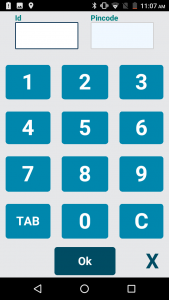
     

    Step 3.                                                                     

    Mainscreen. Click on ‘Scan pas’.
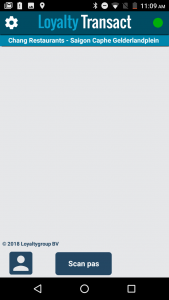
     

    Step 4.

    Scan QR code on membership card.
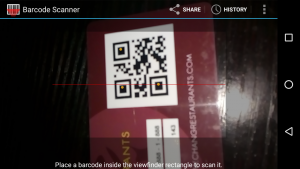
     

    Step 5.

    Press on ‘-‘ to use credits of the customer’s account  for discount.
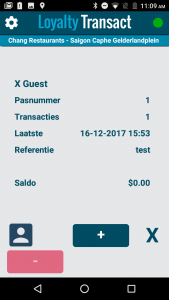
     

    Step 6.

    Fill in the amount of credits the customer wants to use for discount.

    Remember: the credits can be used to a maximum of 50% of the total amount of the receipt! So if the total amount of the receipt is 50 euro, the customer can use her/his credits till a maximum of 25 euro.

    After discount the customer can save again over the 25 euro that is left to pay.
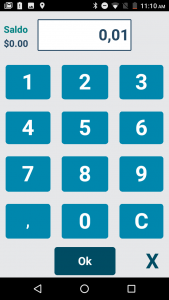
     

    Step 7.

    Press ‘OK’ and the app will subtract the credits automatically from the account of the customer. For more details and game rules please read the guideline or go to www.changrestaurants.com. Every restaurant has it’s own guideline where you can also find the login codes. Thank you.

  • How to: Add credits to Chang Membershipcard

    How to: Add credits to Chang Membershipcard


    Step 1.                                                                                                                           

    Open Membership app (Loyalty).


    Step 2.

    Login to app.


    Step 3.                                                                     

    Mainscreen. Click on ‘Scan pas’.


    Step 4.

    Scan QR code on membership card.


    Step 5.

    Press on ‘+’ to add credits to customer account.


    Step 6.

    Fill in total amount of the receipt*.

    *Fill in total amount of receipt. If a customer already received discount through cashing their credits, they still can save new credits over the amount that they have paid after discount. 

    Step 7.

    Press ‘OK’ and the app will add the credits automatically to the account of the customer. For more details and game rules please read the guideline or go to www.changrestaurants.com. Every restaurant has it’s own guideline where you can also find the login codes. Thank you.