Category: How-to
-

How to close the day POS?
- Collect the following documents:
- Pin receipts and totals
- Some credit card slips need to be signed
- Please double check AliPay/Wechat Pay for success payment
- Loyalty receipts and totals
- Delivery (UberEats, Deliveroo, Thuisbezorgd, Foodsy) receipts and totals
- Please mark re-orders/re-make of orders
- Corrections and other tickets with discount (must have signature and valid reason)
- Example 1: Correction because, did not receive/order item on bill.
- Example 2: Discount manager because ……..
- Example 3: Customer angry because long wait, so we try to make up
- Example 4: Ticket with all staff meal, only for certain restaurants
- Example 5: Forgot to add an item on the bill, but the customer already paid the surcharge
- Pin receipts and totals
- Login as admin, press 7 Einde dag
- At “Overige inkomsten” add the NOT yet typed in bill items like example 5
- At “Correcties” add the NOT yet corrected tickets like example 4
- At “Boodschappengeld terug” add the date it was FROM plus amount
- At “Boodschappengeld opnemen” add the amount you want to save for shopping
- At “Overige uitgaven” add the expenses like AH ticket for buying avocado
- Beware! Do not add “plastic bag” or “private items” on the same bill!
- At “— waarvan NON cash” add the all the ticket totals from point 1.1 till 1.3
- At “CASH geteld (exclusief kassaldo)” type in the amount of bills and coins
- The “Kas verschil” should be 0 (zero)
- Press F8 / Click on “[F8] Verzenden” when you are finished, this will print out 2 reports, 1 for the bank and 1 for the office.
Keep it always nice, tidy and organised!
Dagafsluiting
- Verzamel de volgende bonnetjes:
- Pin bonnetjes en totalen
- Sommige creditkaart bonnetjes moeten voorzien zijn van handtekening
- Dubbelcheck altijd de AliPay/WeChat Pay betalingen of die wel succesvol zijn afgerond
- Loyalty bonnetjes en totalen
- Delivery (UberEats, Deliveroo, Thuisbezorgd, Foodsy) bonnen en totalen
- Markeer de opnieuw gemaakte bestelling, van deze krijgen we minder terug namelijk
- Correcties en andere bonnen met kortingen e.d. moeten voorzien zijn van een geldige reden en handtekening (chef)
- Voobeeld: Correctie/korting omdat de item niet besteld/aangekomen was.
- Voorbeeld: Korting voor manager omdat …..
- Voorbeeld: Klant tegemoet gekomen met korting omdat ….
- Voorbeeld: Bon met alle orders voor personeelseten (geldt alleen voor bepaalde restaurants)
- Voorbeeld: Vergeten een extra drank aan te slaan op de bon, maar de klant heeft wel volledig betaald
- Pin bonnetjes en totalen
- Login als admin, druk/klik op “[7] Einde dag”
- Bij “Overige inkomsten” voeg de nog NIET ingeslagen items toe, zie voorbeeld 5
- Bij “Correcties” voeg de nog NIET gecorrigeerde/korting aangeslagen items toe, zie voorbeeld 4
- Bij “Boodschappengeld terug” vul de datum van oorsprong boodschappengeld en het bedrag in.
- Bij “Boodschappengeld opnemen” vul het bedrag in die je gaat sparen voor boodschappen
- Bij “Overige uitgaven” vul je de uitgaves in, wees zo duidelijk mogelijk, bijv. AH avocado tekort en bedrag in
- Let op! geen tas en of prive zaken op de bon mengen!
- Bij “— waarvan NON cash” vul je alle totalen in van 1.1 tm 1.3
- Bij “CASH geteld (exclusief kassaldo)” vul je de coupures en munten in
- Bij “Kas verschil” zou dan op 0 (nul) moeten komen
- Druk/klik “[F8] Verzenden” wanneer je klaar bent, er komen dan 2 bonnen uit: 1 is voor de bank en 1 is voor het kantoor.
- Collect the following documents:
-
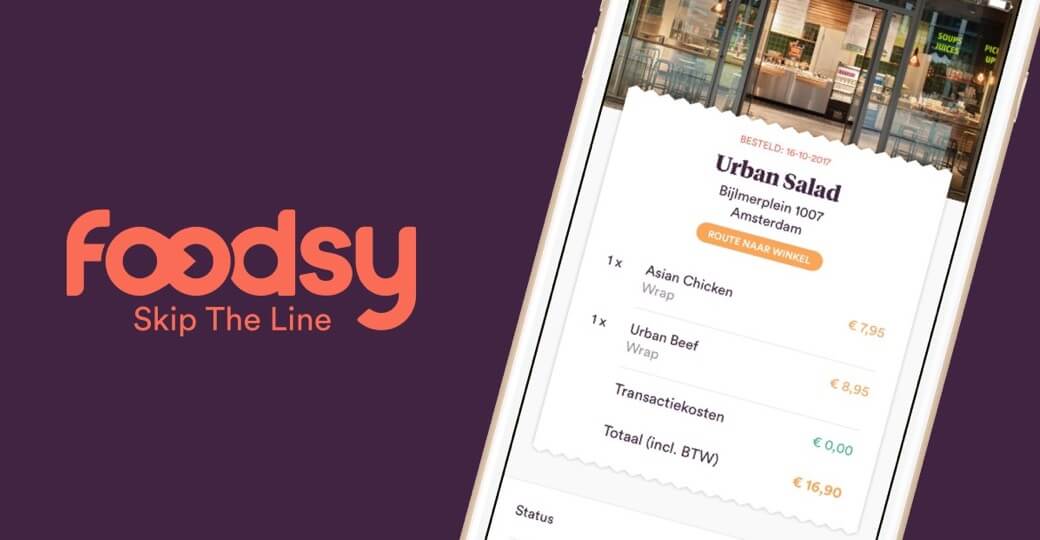
FOODSY – Skip the line app
Klanten vinden wachten vervelend. Zeker op momenten dat ze haast hebben, bijvoorbeeld wanneer ze de trein willen halen of een korte lunch pauze hebben. Daarom doen jullie mee met Foodsy.
De klant kan met deze app zijn maaltijd van te voren bestellen en betalen. De bestelling komt dan bij jullie binnen op de tablet. Jullie hebben genoeg tijd om hem klaar te maken. Dan zetten jullie hem 2 minuten voor de, door de klant gekozen pick up tijd, (die op de tablet en de bon staat) bij de Foodsy pick up plek neer. De klant komt binnen, loopt langs de rij pakt zo zijn product en ons doel is dat hij altijd binnen vijf seconde weer buiten is.
Hier wordt kort uitgelegd hoe Foodsy werkt, het is namelijk erg simpel.
Belangrijk
- Zorg dat zolang jullie open zijn altijd de tablet aanstaat en de stekker erin zit. Na sluitingstijd sluit de tablet automatische af en wanneer jullie open gaan gaat hij automatische aan. Je hoeft er dus niets mee te doen, maar controleer wel voor de zekerheid elke ochtend of Foodsy aan staat op de tablet en de stekker erin zit.
- Zorg dat de bestelling altijd op de door de klant gekozen pick up tijd bij de pick up plek ligt met het bonnetje erop en mocht het nodig zijn bestek erbij en in een tasje.
- Geef aan de to go klanten de flyer mee, zodat ze volgende keer met korting met Foodsy kunnen bestellen.
- Weiger nooit bestellingen. Wanneer je het product niet hebt, accepteer de bestellingen. Op de bon staat het telefoonnummer van de klant dat je kan bellen om een ander product dat je wel hebt aan te bieden. Wanneer het druk is accepteer je de bestelling en pas je daarna rechts boven de drukte aan.
Wanneer er een bestelling binnen komt
- De tablet maakt geluid wanneer de bestelling die binnen is gekomen moet worden klaargemaakt.
- Klik op de grote blauwe knop met accepteren.
- Wanneer je een printer hebt wordt dan de bon uitgeprint, alle info staat ook op het scherm van de tablet.
- Maak het product klaar zet het neer bij het pick up point met het bonnetje er zichtbaar bij. De klant kan zijn eigen product zo snel pakken en is zo weer weg, jullie hebben er verder ook geen omkijken meer naar.
Wifi problemen
- Wanneer de tablet niet verbonden is met de wifi.
- Ga naar instellingen en switch de wifi off en zet de wifi daarna weer aan.
- Klik op de twee vierkantje links onder op de tablet zodat alle open apps openen. Swipe Foodsy weg zodat die helemaal afsluit.
- Klik op de homeknop (wanneer je weer verbinding hebt en klik opnieuw op Foodsy om Foodsy opnieuw te openen.
-
AliPay/Wechat Pay Manual
More and more of our customers from Asia are spending digital money by using WeChat and AliPay, please read manual for operations instructions.
-

Howto Eat Sushi
Ofcourse everybody has their own favorite way of eating sushi, but in case a customer needs some help, you can use the text in linked guide to explain to him/her!
Nice introduction about sushi eating https://blog.gaijinpot.com/eating-sushi-the-proper-way/
http://gabrielwhiteboard.blogspot.nl/2014/08/how-to-eat-sushi.html
-

Howto: Eat Vietnamese Spring Rolls (Cha-Gio)
Eat deep fried spring rolls “Cha Gio” (pronounced Dja Yaw) like a real Vietnamese!!!
- Take a lettuce leaf
- Wrap spring roll in lettuce leaf
- Dip in Sweet chilli sauce
Deep fried soft shell crab is also very delicious with lettuce leaf!
[embedyt] https://www.youtube.com/watch?v=B2vkrNHSLao[/embedyt]
Read more about Cha Gio at Wikipedia
See how Cha Gio is made!
[embedyt] https://www.youtube.com/watch?v=T_o_T3LEYLY[/embedyt]
-
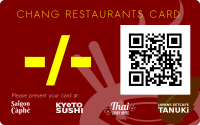
How to: Cash-In Chang Credits with Loyalty Card
Step 1.
Open Membership app (Loyalty).
Step 2.
Login to app.
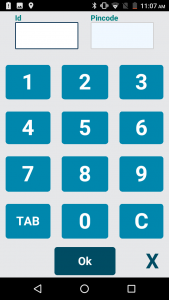
Step 3.
Mainscreen. Click on ‘Scan pas’.
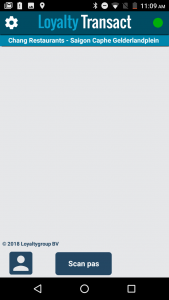
Step 4.
Scan QR code on membership card.
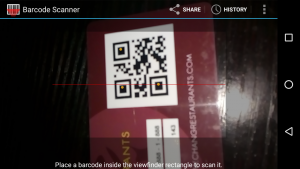
Step 5.
Press on ‘-‘ to use credits of the customer’s account for discount.
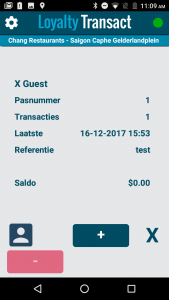
Step 6.
Fill in the amount of credits the customer wants to use for discount.
Remember: the credits can be used to a maximum of 50% of the total amount of the receipt! So if the total amount of the receipt is 50 euro, the customer can use her/his credits till a maximum of 25 euro.
After discount the customer can save again over the 25 euro that is left to pay.
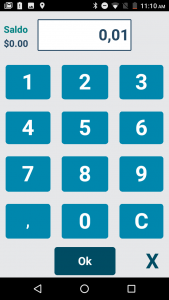
Step 7.
Press ‘OK’ and the app will subtract the credits automatically from the account of the customer. For more details and game rules please read the guideline or go to www.changrestaurants.com. Every restaurant has it’s own guideline where you can also find the login codes. Thank you.
-
Chang Loyalty Card
Membership for customers
Step 1 → Ask the customer to become a member of the Chang Restaurants membership.
When the customer has finished his dinner and is asking for the check, you can ask them if they like to become a member of the Chang restaurants membership.
Advantages for the customers:
- Every time when the customer is having dinner in one of our restaurants they can save ‘Chang credits’ that will be added to the membershipcard, for example:
Total price of the check: 35,00 euro → they save 5% (1,75 euro) on the membershipcard in Chang credits.
The customer can decide when they want to cash the saved Chang credits on the membershipcard (please note: it is not possible to save credits on a check and then immediately cash in the credits for the same check! So always scan the card after payment. The saved credits can be cashed at the first following payment in the restaurant.). The saved Chang credits on the card can only be cashed in use with a check in one of our restaurants.
Please note that when the customer wants to cash their saved Chang credits, it is only possible to pay 50% of the total price of the check with Chang credits, regardless how many Chang credits are saved. The staff has to split the check half way, 50% Chang credits + 50% cash (or pin).
Please note that the customer has to be registrated with the card when they want to cash the saved Chang credits on the card. Registration means that the required fields in their account has to be filled: name (first+last), e-mailaddress, phonenumber and postal code.
- In the future the customer can provide from actions that is valid for memberships only.
Step 2 → Explain how the customer can become a member
You always give the customer a membercard first.
Step 1. The customer always has to the website www.changrestaurants.com and registrate with the code that is noted on the card. They will receive an email with the link for the app and interface. They can choose to download the app, it has a lot of advantages: they can check on the app how much credits they have saved, and the app also has a QR code, with this code the customer can scan in the restaurant with the app instead of the physical card. On the interface they can also check their amount of saved credits.
Extra option for people who dont have a smartphone or computerskills: Give the customer the paper registration form and let them fill in their information + codes from the card. End of the day you have to fill in the registration through the link on the website. Important: they do need to have an emailaddress.
Please note that we have 3 type of customers: Referentiepartij, VIP and Normal customers. Referentiepartij are for example companies like China Airlines, Cathay Pacific etc. VIP are friends/family etc of employees for example. We want to separate these customers in our database so it is important to send the card codes + names + e-mailaddresses of these customers to the backoffice, they can process this in the database when the customer has been registrated. You can do this by email and send it to admin@changrestaurants.com, in the headline: “Referentiepartij or VIP Membership + name of the restaurant” and in the mail the card codes + names + e-mailaddresses.
The backoffice will process this once a month so there can be a little delay, please inform the customers correctly.
Process Membershipcards customers
Scan the membershipcard of the customer
Each restaurant has 1 terminal that can scan the QR code from the membershipcard, this a phone or a tablet with camera.
When the customer has paid the check you can scan the QR code on the app or membershipcard with the terminal. After you scanned the card you fill in the total price of the check, and that’s it! The terminal will calculate automatically the amount of Chang credits that the customer has saved and add this to the account of the customer.
Please note that only managers and selected employees are allowed to scan.
Please note that there is a maximum price (200 euro) to scan in once.
For example: If the total price of the check is 300 euro, then you have to scan twice: the first time 200 euro, the second time 100 euro.
We have three types of customers:
– Normal customers (saves 5% each time)
– Corporate customers (saves 10% each time)
– VIP customers (saves 10% each time)
At the moment the Corporate customers (for example: China Airlines, Cathay Pacific etc.) receive 10% discount, this will change from now on. They will NOT receive discount on the check any more, they will save 10% on the membershipcard. VIP customers (for example friends/family/special customers) will also NOT receive discount any more, they will save 10% on the membershipcard.
So just to be clear: We do not give discount on the check any more.
Extra: You can see what type of customer it is when you scan the membershipcard (this is useful when for example a Referentiepartij is visiting one of the other restaurants and the staff does not know that it is a Referentiepartij or VIP).
Information Employee Loyalty Card
For the employees of Chang Restaurants we have the employee membershipcard. Each employee that works for our restaurants receives an employee membershipcard. With this card the employee saves ‘Chang credits’ with his or her working hours that can be used in one of our restaurants.
With every hour tthe employee works, he or she saves 0,10 euro. So for 100 working hours a month will be 10 euro added to the account. These Chang credits can only be spend in one of our restaurants.
Employees will not receive discount on the check anymore!
When an employee eats in one of our restaurants he or she can save Chang credits with membershipcard:
10% parttimers
20% fulltimers
30% managers
So the employee saves in two ways:
- Per working hour
- Saving Chang credits (10% parttimers, 20% fulltimers, 30% managers) with the card when you eat and pay in one of our restaurants
The registration of this empoyee membershipcard is the same as a membershipcard for customers:
Step 1. The employee always has to go the website www.changrestaurants.com and registrate with the code that is noted on the card. They will receive an email with the link for the app and interface. They can choose to download the app, it has a lot of advantages: they can check on the app how much credits they have saved, and the app also has a QR code, with this code the customer can scan in the restaurant with the app instead of the physical card. On the interface they can also check their amount of saved credits.
Extra option for people who dont have a smartphone or computerskills: Give the employee the paper registration form and let them fill in their information + codes from the card. End of the day you have to fill in the registration through the link on the website. Important: they do need to have an emailaddress.
Please note that the backoffice need to know which codes belong to an employee, otherwise the employees will be registrated as customer. The manager of the restaurant has to send the codes+ names+ e-mailaddresses to the back office by e-mail (all in once please!), to admin@changrestaurants.com with headline: “Employees membership + name of the restaurant” and in the mail the card codes + names
+ e-mailaddresses.Every employee has to fill in their e-mailaddress by registration!
When you want to sign up a new employee, you can already fill in the following information in the application form: E-mailaddress + codes from the card.
Please note that the employee starts saving Chang credits when the registration is completed. There will be no Chang credits given over the period before the employee has been registrated.
Please note: it is not possible to save credits on a check and then immediately cash in the credits for the same check! So always scan the card after payment. The saved credits can be cashed at the first following payment in the restaurant.
FAQ
Customers
Where can I see how much Chang credits I have saved so far?
1. On the Chang Restaurants App
2. On the website www.changrestaurants.com is a link for the membershipcard, when the customer clicks on the link and logs in the saved Chang credits will show in the account.
3. For customers who do not have an app or computer → call backoffice and give the backoffice the codes that are noted on the card or the name of the customer (they have to be registrated)→ they can look it up for you.
Opening hours backoffice (020-6361978):
Monday till Friday from 09.00 till 17.00.
I want to share my account with my co-workers or family, is this possible?
No, this is not possible. Every person has it’s own membershipcard and can only save Chang credits on their own account.
I forgot my card, can I still save my Chang credits?
If the customer has the app, you can scan the QR code on the app. Otherwise there is unfortunately no possibility to save the Chang credits.
Where can I cash my saved Chang credits?
The Chang credits can be cashed in all of the Chang Restaurants:
- Saigon Caphe (Gelderlandplein, Leidseplein, Central station)
- Tanuki (Amstelveen, Gelderlandplein)
- Kyoto (Damrak, Central station)
- Thai Curry House (Gelderlandplein)
- Japan Inn (Leidsekruisstraat)
Please note that the credits will not return CASH but can only be used for the check in one of the Chang Restaurants.
When can I cash my Chang credits?
The customer can cash the saved credits any time in one of the Chang Restaurants. It is not possible to save credits on a check and then immediately cash in the credits for the same check! So always scan the card after payment. The saved credits can be cashed at the first following payment in the restaurant.
I want to cash my Chang credits but it is not working.
If the customer wants to cash the Chang credits they have to be registrated (this means that they have to fill in their e-mail adress, phone number and postal code in their account) The registration can be done through the app, website link or the paper registration form.
I lost my card (stolen, lost etc.), what do I have to do?
This is not a problem and the customer has not lost his or hers Chang credits (if they are registrated!). Give the customer a new membershipcard. Ask the customer the their name (first- and surname) + e-mailaddress, call the backoffice and they can search by the registrated name and e-mailaddress for the account of the customer. The backoffice will replace the old card codes for the new card codes that you gave to the customer. This way the saved Chang credits will stay the same in the account of the customer.
I do not want to be part of the membership anymore.
Take in the membershipcard. Note the first- and surname of the customer and inform the backoffice, they can remove the account for you. After te account is removed the card can be re-used (only when the card still looks good).
I already saved points through the old saving system of Chang, what will happen with these points?
Send backoffice new cardcodes and old cardcodes, they will put the same amound of saved points tot he new Chang membershipcard.
FAQ
Employees
Where can I see how much Chang credits I have saved so far?
1. On the Chang Restaurants App
2. On the website www.changrestaurants.com is a link for the membershipcard, when the customer clicks on the link and logs in the saved Chang credits will show in the account.
3. For employees who do not have an app or computer → call backoffice and give the backoffice the codes that are noted on the card or the name of the customer (they have to be registrated)→ they can look it up for you.
Opening hours backoffice (020-6361978):
Monday till Friday from 09.00 till 17.00.
Where can I cash my saved Chang credits?
The Chang credits can be cashed in all of the Chang Restaurants:
- Saigon Caphe (Gelderlandplein, Leidseplein, Central station)
- Tanuki (Amstelveen, Gelderlandplein)
- Kyoto (Damrak, Central station)
- Thai Curry House (Gelderlandplein)
- Japan Inn (Leidsekruisstraat)
Please note that the credits will not return CASH but can only be used for the check in one of the Chang Restaurants.
When can I cash my Chang credits?
The employee can cash the saved credits any time in one of the Chang Restaurants. It is not possible to save credits on a check and then immediately cash in the credits for the same check! So always scan the card after payment. The saved credits can be cashed at the first following payment in the restaurant.
I want to cash my Chang credits but it is not working.
If the employee wants to cash the Chang credits they have to be registrated (this means that they have to fill in their e-mail adress, phone number and postal code in their account) The registration can be done through the app, website link or the paper registration form.
I lost my card (stolen, lost etc.), what do I have to do?
This is not a problem and the employee has not lost his or hers Chang credits (if they are registrated!). Give the employee a new membershipcard. Call the backoffice and they can search by e-mailaddress and registrated name for the account of the employee. The backoffice will replace the old card codes for the new card codes that you gave to the employee. This way the saved Chang credits will stay the same in the account of the employee.
What happens if the employee no longer works any more for the Chang Restaurants
When the employee wants to stops working for the Chang Restaurants by own choice they can use the Chang credits they saved while they are still working/ or untill their last paycheck.
When an employee is fired they will loose their saved Chang credits, please inform the backoffice about this employee so they can remove the account. Also take in the membershipcard from the employee.
After the account is removed the card can be re-used (only when the card still looks good).
Please note that the employee starts saving Chang credits when the registration is completed. There will be no Chang credits given over the period before the employee has been registrated.
Registration form Membership Chang Restaurants
Personal
*First name
*Last name
Birth date (dd-mm-yyyy)
*E-mailadress
Address
Streetname
Housenumber
*Postal code
City
Phone number
*Mobile phone number
*Membership card information
Card number: 888- -888 | CVC:
*Required fields
-

How to: Add credits to Chang Membershipcard
Step 1.
Open Membership app (Loyalty).
Step 2.
Login to app.
Step 3.
Mainscreen. Click on ‘Scan pas’.
Step 4.
Scan QR code on membership card.
Step 5.
Press on ‘+’ to add credits to customer account.
Step 6.
Fill in total amount of the receipt*.
*Fill in total amount of receipt. If a customer already received discount through cashing their credits, they still can save new credits over the amount that they have paid after discount.
Step 7.
Press ‘OK’ and the app will add the credits automatically to the account of the customer. For more details and game rules please read the guideline or go to www.changrestaurants.com. Every restaurant has it’s own guideline where you can also find the login codes. Thank you.